
Difference between Clustered Index Scan and Index Scan in SQL Server


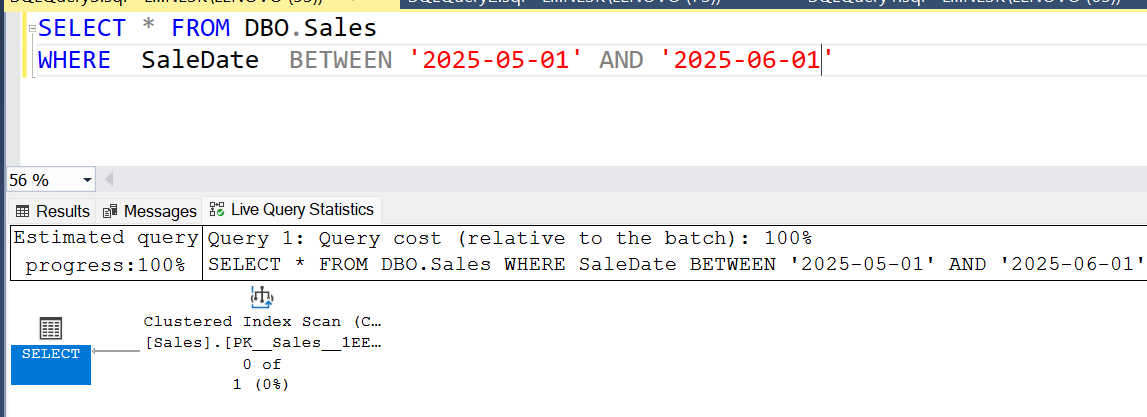
1.Clustered Index Scan

✅ What it is:

  • A Clustered Index Scan means SQL Server is scanning every row of the entire table,  essentially performing a "table scan" because the clustered index is the table itself. 

📌 When it happens:

  • No WHERE clause or very broad filter (low selectivity).
  • Join/filter columns aren’t indexed selectively.
  • Query needs most or all columns (covering queries).

🧠 Performance Insight:

  • Can be expensive for large tables.
  • Usually appears when SQL Server can’t seek and needs to read all data.


Example:  

Table:

CREATE TABLE dbo.Sales
(
    SaleID INT NOT NULL IDENTITY,
    SaleDate DATE NOT NULL,
    Quantity INT NOT NULL, PRIMARY KEY (SaleID)
)

Query:

SELECT * FROM dbo.Sales
WHERE  SaleDate  BETWEEN '2025-02-04' AND '2025-02-10'


2. Index Scan (Non-Clustered)

✅ What it is:

  • A Non-Clustered Index Scan scans all rows in a specific non-clustered index( not the full table)

📌 When it happens:

  • The query filters on a column included in a non-clustered index, but can’t use a seek.

🧠 Performance Insight:

  • Faster than scanning the whole table if only a few indexed columns are needed.
  • Less I/O than clustered scan when index is narrow and well-designed.


Comments

Popular posts from this blog

  Microsoft Power BI- Solve Problem  "Map and Filled Map Visuals aren't Enabled"   When you try to use Map or Filled Map from Visuals for the 1st time , you may get the following warning : "Map and Filled Map Visuals are disabled". This means you need to go to Options and have to enable these Visuals. Go to File ->Options and Settings-> Options -> Security-> Enable Map and Filled Map Visuals. (After this, in some cases you may need to close and reopen Power BI desktop) Now Go to Add Visual Then double click on Map or Filled Map. After that, you will be able to add Location, Legends etc. without any issues.

While executing Select query to pull data from a different server, SQL Server is showing following error:

Msg 7202, Level 11, State 2, Line 1 Could not find server 'LAPTOP-09O6NE3K\SQLEXPRESS03' in sys.servers. Verify that the correct server name was specified. If necessary, execute the stored procedure sp_addlinkedserver to add the server to sys.servers. Completion time: 2024-02-05T17:18:24.6869756+05:30 Solution: Step1:  Check if the server is available in the sys.servers table SELECT name from sys.servers Step2:  If no, add the new server to the sys.servers table EXEC sp_addlinkedserver @server = 'server name' Eg" EXEC sp_addlinkedserver @server = 'LAPTOP-09O6NE3K\SQLEXP RESS03' Step3:  Recheck if the new server name is added to the sys.servers table. If yes, try then rerunning the select query which throwed the error. Now it should pull data from the table in the new server successfully.